51rf6mtbcdl ac sl1200 1773792139
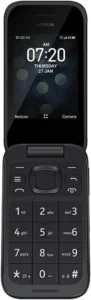
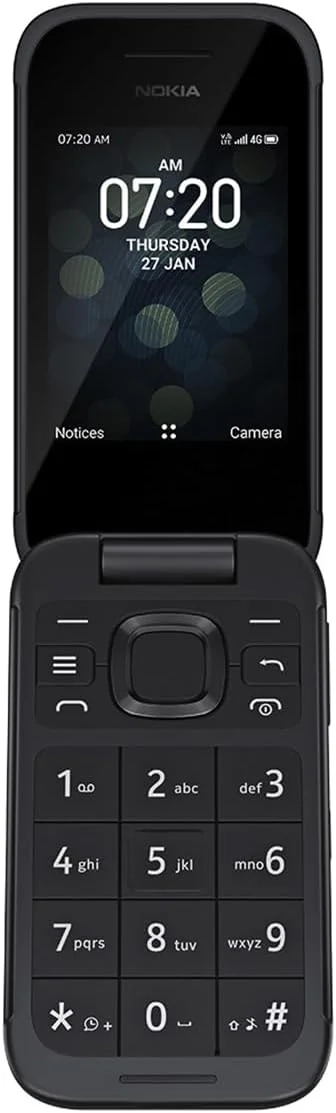
The Nokia 2780 Flip is a 4G flip phone that blends a classic design with modern features. It has a simple, intuitive interface and two large screens for easy texting and call viewing.
Built to be durable, it’s designed to withstand everyday use. It includes accessibility features like big buttons, hearing aid compatibility, and Real-Time Text (RTT). A dedicated side button can be programmed for emergency dialing.
Key features include: * FM radio and a 3.5mm audio jack. * Up to 18 days of standby time and 7 hours of talk time on a single charge. * 4G connectivity for using apps, browsing the internet, and making high-quality HD Voice (VoLTE) calls. * A loudspeaker, adjustable volume, and a 5 MP rear camera for photos, video recording, and playback.
A Guide to Getting Started with Your New 4G Flip Phone
Staying connected in today’s world doesn’t require a complex smartphone. For those seeking reliability, simplicity, and robust features, a modern flip phone is an excellent choice. This guide will walk you through the key details of setting up and utilizing your new device to its full potential.
First Step: Ensuring Network Compatibility
Before proceeding with setup, confirming your device’s network compatibility is essential. This phone is unlocked and designed to function with major 4G LTE carriers across the United States, including, but not limited to, AT&T, T-Mobile, Boost Mobile, Cricket Wireless, Metro by T-Mobile, and Tracfone brands like Simple Mobile and Net10. However, compatibility is ultimately dependent on your specific carrier’s network and the available coverage in your region. We strongly recommend verifying with your chosen service provider that this device model is supported on their network to ensure seamless activation and optimal service.
Initial Setup: Installing the Battery
Please note that for safety during shipping, the battery is packaged separately. Upon unboxing, you will find the battery secured in a plastic bag beneath the packaging divider. To install it, you must first access the battery compartment. Gently pry off the device’s rear cover—this is the same panel that protects the battery during normal use. Insert the battery into the compartment, ensuring the connectors align properly. Before charging, securely reattach the back cover. It is important to keep this cover on at all times during both charging and regular use for proper device function and safety.
Designed for Connection and Peace of Mind
This phone combines classic durability with modern accessibility. It features a rigorously crafted flip design that protects the keypad and screen. The external display allows you to view caller ID without opening the phone, and you can simply close the flip to end a call. Accessibility is a core focus, with features like amplified sound, hearing aid compatibility, large, tactile buttons, and Real-Time Text (RTT) support. For added security, a dedicated, programmable side button lets you instantly dial a loved one or emergency contact.
Smart Features in a Simple Package
Beyond calling and texting, this device keeps you connected to more. You can browse the internet, check email, and download helpful applications from the curated app store, all over a 4G LTE connection. It’s a thoughtfully engineered device that provides the essential tools for communication and information without unnecessary complication, perfect for anyone who values durability, ease of use, and dependable performance.