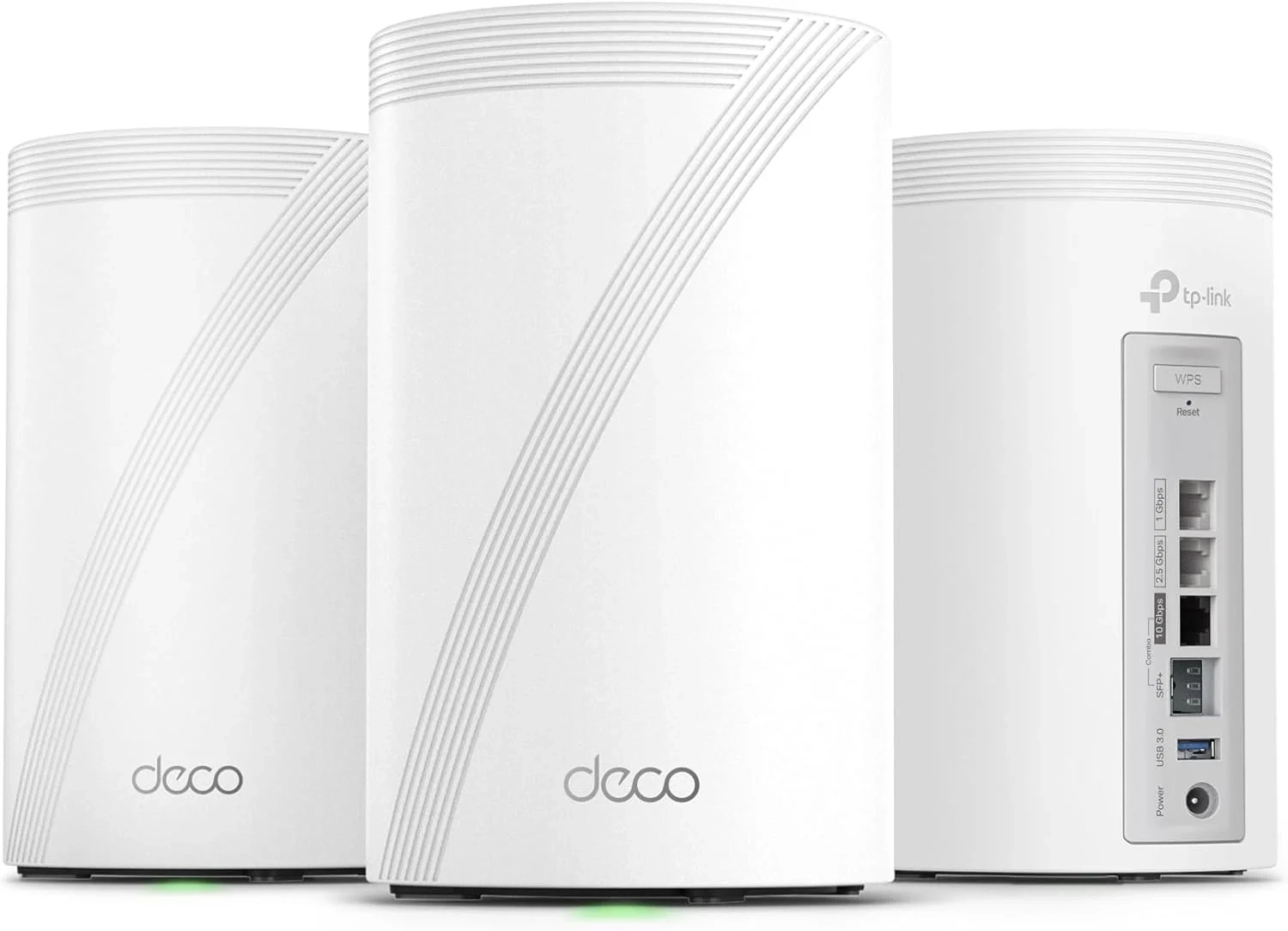
TP-Link Deco 7 Pro BE17000 Mesh Wi-Fi 7 Setup Guide
Many users look for a powerful WiFi 7 solution to eliminate dead zones. This guide explains how the Deco BE77 mesh system provides reliable, whole-home coverage for large households and tech enthusiasts. We’ll detail its key features and performance for seamless connectivity.
Introduction
In today’s connected home, a weak Wi-Fi signal can disrupt everything from video calls to movie nights. Upgrading to a robust mesh system is the definitive solution for eliminating dead zones. The TP-Link Deco 7 Pro BE77 represents the pinnacle of this technology, leveraging the latest Wi-Fi 7 standard to deliver unprecedented speed and coverage.
This tri-band mesh system is engineered for the most demanding digital households. It promises to transform your home network into a seamless, high-speed web that keeps every device running smoothly.
Wi-Fi 7 Mesh Network Problems and Solutions
Many users struggle with inconsistent internet, especially in larger homes. Common issues include buffering during 4K streaming, lag in online gaming, and dropped connections on IoT devices. These problems often stem from a single router that can’t penetrate walls or cover multiple floors effectively.
A standard setup fails when you have numerous devices competing for bandwidth. The result is a frustrating experience where your smart home gadgets, work laptops, and gaming consoles are all fighting for a weak signal. This is where a dedicated whole home mesh Wi-Fi system proves essential.
Step-by-Step Solutions
Implementing the Deco 7 Pro BE77 system is straightforward and solves these core connectivity issues.
- Strategic Unit Placement: Start by placing your main Deco unit near your modem. Position additional units about halfway to the farthest dead zone, ensuring they are within a good range of each other for a strong backhaul connection.
- Use the Deco App: Download the TP-Link Deco app. It will guide you through a simple setup, helping you create one unified network name (SSID) for your entire home.
- Leverage High-Speed Ports: For the fastest possible connection, use the 10 Gbps or 2.5 Gbps port to connect a gaming PC, NAS device, or a multi-gigabit internet modem directly to your main Deco unit.
- Enable AI-Roaming: This feature is automatic. It ensures your devices seamlessly switch to the strongest node as you move around, preventing manual reconnections.
Alternatives and Comparisons
While the Deco 7 Pro BE77 is a top-tier Wi-Fi 7 router, alternatives exist. Older Wi-Fi 6 or Wi-Fi 6E mesh systems are more affordable and sufficient for most households without multi-gigabit internet plans. However, they lack future-proof technologies like Multi-Link Operation (MLO).
Single, powerful Routers are another alternative. They can be excellent for apartments but often fail to provide consistent coverage in multi-story or large homes. For true blanket coverage, a mesh system like the Deco 7 Pro is superior, creating a single, powerful network cloud.
Practical Use Cases
The power of this system shines in real-world scenarios. A family can simultaneously stream 8K video in the living room, engage in competitive cloud gaming in a bedroom, and have video calls in the home office—all without a hint of lag.
For smart home enthusiasts with dozens of IoT devices, the system’s capacity prevents network congestion. Furthermore, the 10 Gbps port is perfect for professionals working with large media files, allowing for lightning-fast transfers to a network-attached storage device. You can find more advanced setups like this in our Smart Home and Technology Blog categories.
FAQs
What is the Deco 7 Pro BE77?
The Deco 7 Pro BE77 is a tri-band whole home mesh Wi-Fi system that uses Wi-Fi 7 technology. It uses multiple units placed around your home to create a single, seamless network that eliminates dead zones and provides extremely high speeds.
How does a Wi-Fi 7 mesh system compare to a Wi-Fi 6 router?
A Wi-Fi 7 mesh system like the Deco 7 Pro offers significantly higher potential speeds, lower latency, and more efficient data handling through features like MLO. Most importantly, as a mesh, it provides far wider and more consistent coverage than a single router, which is crucial for large spaces.
Is the Deco 7 Pro BE77 worth it for gaming?
Absolutely. For serious gamers, its Wi-Fi 7 capabilities and ultra-low latency are ideal for immersive AR/VR gaming and competitive online play. The dedicated high-speed ports ensure a wired-like connection for consoles or PCs, and the AI-Roaming provides a stable signal anywhere in the house. Explore more high-performance gear in our Gaming and Accessories section.
Conclusion
The TP-Link Deco 7 Pro BE77 is a formidable solution for modern connectivity challenges. It combines the expansive coverage of a mesh network with the cutting-edge speed and efficiency of Wi-Fi 7. By following the proper setup and leveraging its advanced features, you can build a home network that is ready for today’s demands and tomorrow’s innovations.
About This Topic
A whole home mesh Wi-Fi system is a network solution that uses multiple interconnected nodes or units placed strategically throughout a living space. Unlike a single traditional router, these systems work together to blanket an entire home with a strong, unified wireless signal, effectively eliminating dead zones and providing consistent performance on every floor and in every room.
This technology benefits anyone frustrated with spotty internet coverage, especially owners of large homes, multi-story residences, or homes with challenging layouts. It is equally valuable for households with a high number of connected devices—from smartphones and laptops to smart TVs, security cameras, and gaming consoles—where network congestion commonly occurs. Professionals working from home who require reliable video conferencing and fast file transfers will also find immense value in the stability and speed a robust mesh system provides.
A common misconception is that mesh systems are overly complex or only for tech experts. Modern systems are designed for simple, app-based setup and management, making them accessible to most users. Another concern is that adding more nodes slows the network down; however, high-performance systems like tri-band Wi-Fi 7 models use a dedicated wireless band for communication between nodes, preserving maximum speed for your devices. When evaluating options, key features to consider include the wireless standard (like Wi-Fi 6E or Wi-Fi 7), the availability of high-speed Ethernet ports for wired backhaul or device connections, and the system’s total coverage capacity.
Technical Specifications
-
Wireless Networking & Wi-Fi Standards
- Supports the latest Wi-Fi 7 (802.11be) for maximum future-proof performance
- Backward compatible with Wi-Fi 6E (802.11ax), Wi-Fi 6 (802.11ax), Wi-Fi 5 (802.11ac), and legacy Wi-Fi 4 (802.11n) and Wi-Fi 3 (802.11g) standards
- Multi-standard operation ensures compatibility with virtually all modern and older Wi-Fi devices
-
Performance & Connectivity
- Delivers ultra-fast wireless speeds and high-efficiency data handling via Wi-Fi 7
- Provides improved network capacity and reduced latency for gaming and streaming
- Ensures reliable whole-home coverage and stable connections across all supported protocols
-
Compatibility Details
- Fully compatible with devices using Wi-Fi 7, Wi-Fi 6E, Wi-Fi 6, Wi-Fi 5, and earlier generations
- Works seamlessly with routers, access points, and client devices from all major manufacturers
- Supports dual-band (2.4 GHz and 5 GHz) and tri-band (2.4 GHz, 5 GHz, and 6 GHz) operation where applicable